Research Background
Care coordinators face inefficiencies in managing patient workflows, leading to increased administrative burdens and fragmented processes. Existing tools may not fully support their needs, limiting efficiency and patient care. There is an opportunity to optimize technology to streamline workflows and improve outcomes.
Research Objectives
Understand the workflows and the tools users are using.
Identify & understand users pain pointslat
Determine opportunities of how and where in the process technology can assist in making care coordinators’ days more efficient.
Research Goals
Understand the roles of care givers in facilitating the medical journey for their patients.
Research Methods
Qualitative: moderated interviews where a researcher asks existing care coordinator questions to gain an understanding of their roles, used tools, pain points, and feelings.
Quantitative: collecting data regarding the number clinics, providers, and patients supported by care coordinator .
Sessions’ Details
1 week (Jan 30 – Feb 3rd)
6 sessions
Each session is 1.5 hours long.
Structured interview
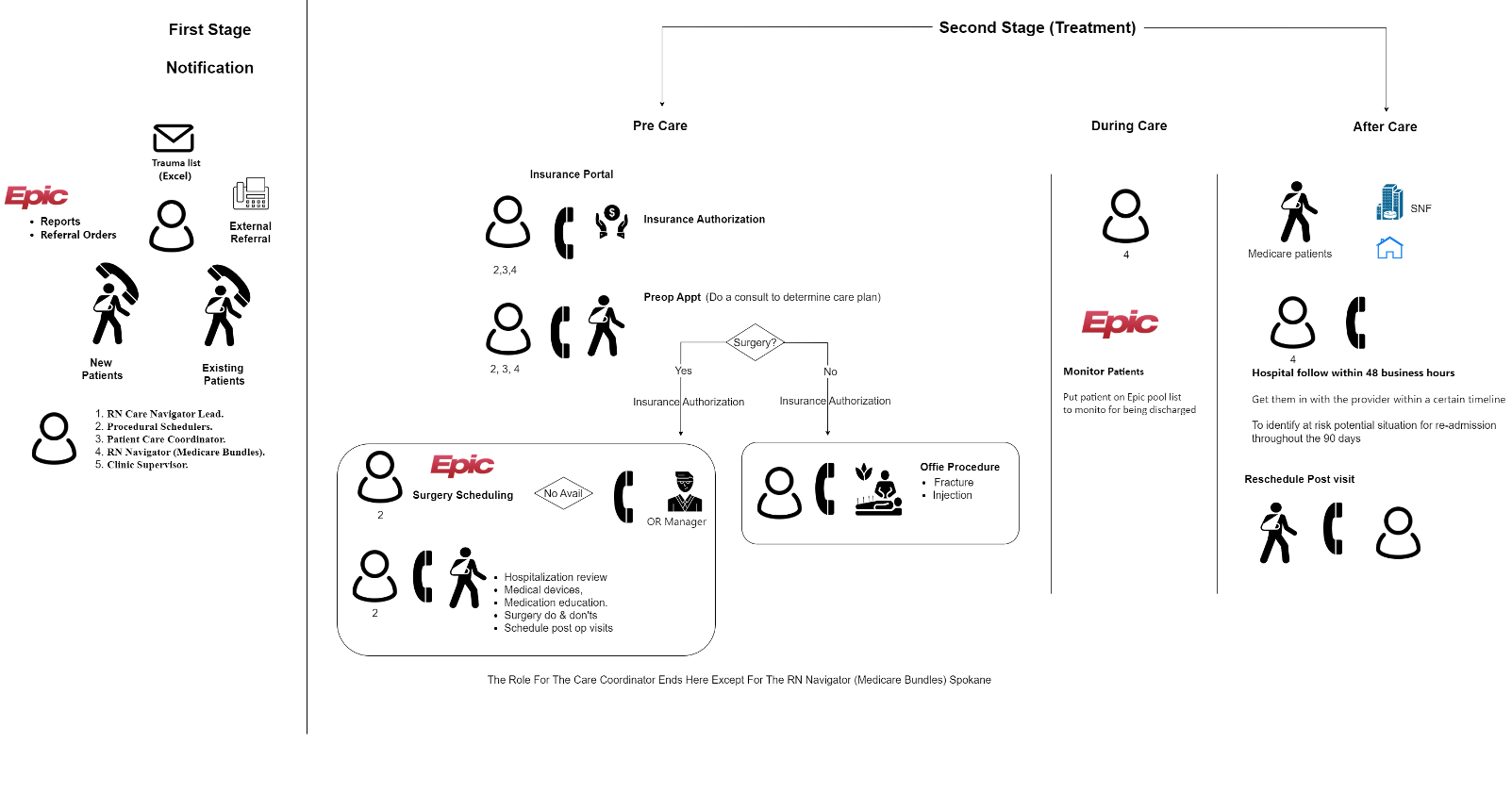
Users
6 care givers that provide care coordination.
Roles: RN Care Navigator Lead, Procedural Schedulers, Patient Care Coordinator, RN Navigator (Medicare Bundles), Clinic Supervisor
Specialty: (Orthopedics) & Primary care
Research Questions
What is the end-to-end workflow?
How do users find new patients?
How do users provide care and support through the patient's journey?
What are the opportunities to optimize technology in the workflow?
What are desired product features for care coordinator?
WorkFlow
Findings
PATIENT SUPPORT
Care coordination roles & responsibilities
PATIENT RESOURCES
PDF documents printed & handed to patients during their appointments
Surgery letters: Epic SMART phrases that are customized, printed and mailed to patients prior to their procedure.
INTERNAL CAREGIVERS & PROVIDERS
Appointment scheduling
Pre-op appointment, surgery & post-op appointment
Navigation
Hospital directions for surgery
Education
Surgery prep and instructions; discharge requirements; medications changes
Interpreters
Coordinate in-person or virtual interpreter services for appointments.
Patient communication tools
The usage of which tool to use depends on patient preference & urgency.
PHONE
ShoreTel: phone system to call patients
Twistle: pre & post-op care reminders: text message
MYCHART MESSAGING
Communicating through MyChart portal.
Immediate Response
Needed

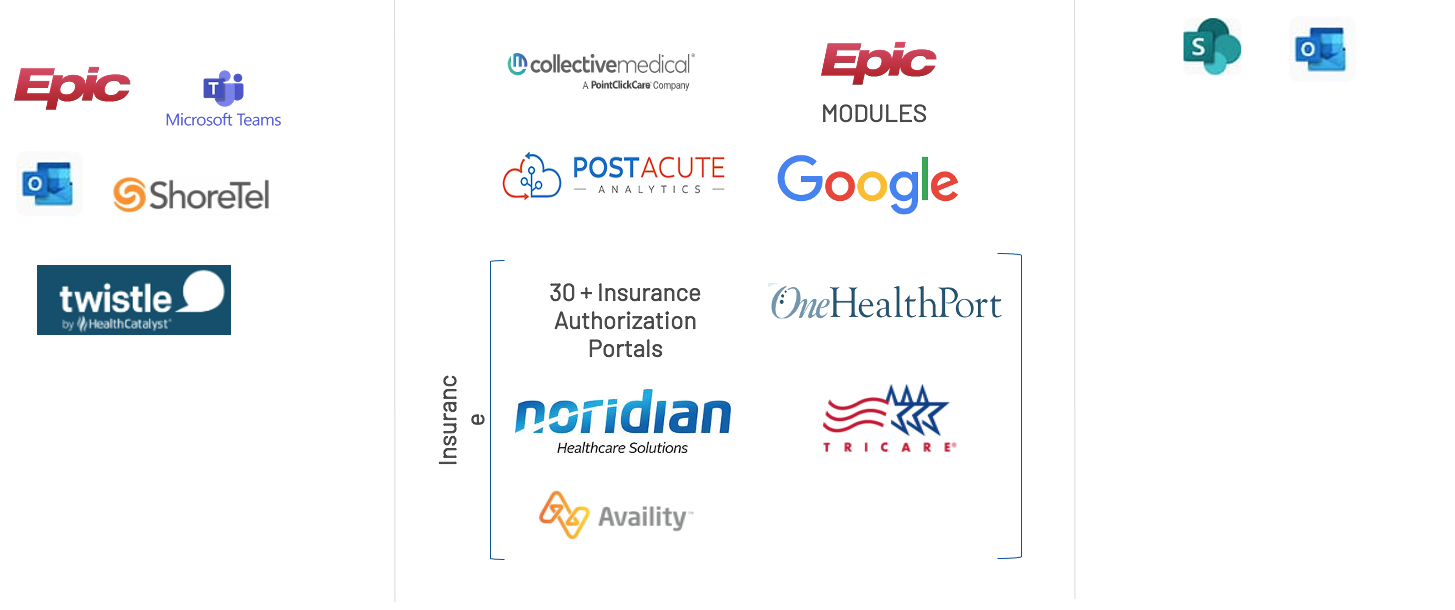
Other tools for day to day activities
COMMUNICATION TOOLS
Use various resources to develop a manual patient trackers
Epic Reporting Workbench
Post Acute Analytics (PAA)
Unable to find the right person from other clinics (internal & external) Needtoknowtheperson'snametobeabletomessage/email.
Unable to quickly message external caregivers. Required to call & wait on the phone.
Challenging to know what communication tool to use when contacting another team member.
“Telephone" & miscommunication among clinic team members
Pain Points
Phone technology is unreliable (e.g. dropped calls)
Phone fatigue: Cumbersome to have phone calls as the primary mode of communication.
Communication tools provide general or misinformation that is not helpful (e.g. Twistle, mPulse)
Pain Points
Pain Points
Solution Gaps
Quotes
Quotes
Quotes
Quotes
Quotes
Doesn't Require Immediate
Response
Pain Points
Manual, varied & intensive process (submission & tracking)
Inconsistent rules & requirements
Each payer requires different authorization information
Multiple channels for authorization submission (e.g. phone, fax, web portal).
Pain Points
Proactive investigation to identify patients that require follow-up.
Several tools & reports to for referral & follow-up
Epic reports, Anna System, Collective Medical, Compass Rose
Manual tracking
Develop manual tracking system (e.g. excel, sticky notes, folders, Epic pools etc.).
Referral tools are inaccurate / missing information
(e.g. dependent on external care teams to keep information updated, lag time of information, limited access based on your role)
Inefficient follow-up: patient phone calls or mailed letters
Pain Points
Complex
Insurance Authorization Portals
Switch between different screens and tools to find information.
Tool fatigue; too busy to learn how to use the tools
Solutions are not integrated.
(e.g. unable to save documents to desktop for security / HIPPA )
Unable share or access resources from other teams or specialties.
Resource documents are not centralized.
Different ways to manage and access resources (e.g. Outlook calendar, email, SharePoint, MS teams).
Document control + keeping information up-to-date
Solution Ideas
1. CENTRALIZE COMMUNICATIONS
Connects & directs all messages
(MS teams, mychart messages & secure chat) in one place.NLP to categorize & prioritize messages to determine response time.
Creates message thread to make it easy to see prior history.
Caregiver communication tools
CARE MANAGEMENT TOOLS
MS Teams Chat
Epic Secure Chat
In-Person
Phone
MyChart Messages
Email
In-Person
Phone
"Most communication is done via MS teams with team members & leadership.“ “Email from the secretary from the ER for trauma patients (outlook). ” “Surgeons will only use myChart; most refuse to use MS teams." Nursing facilities have low adoption of using the PAA communication module.”
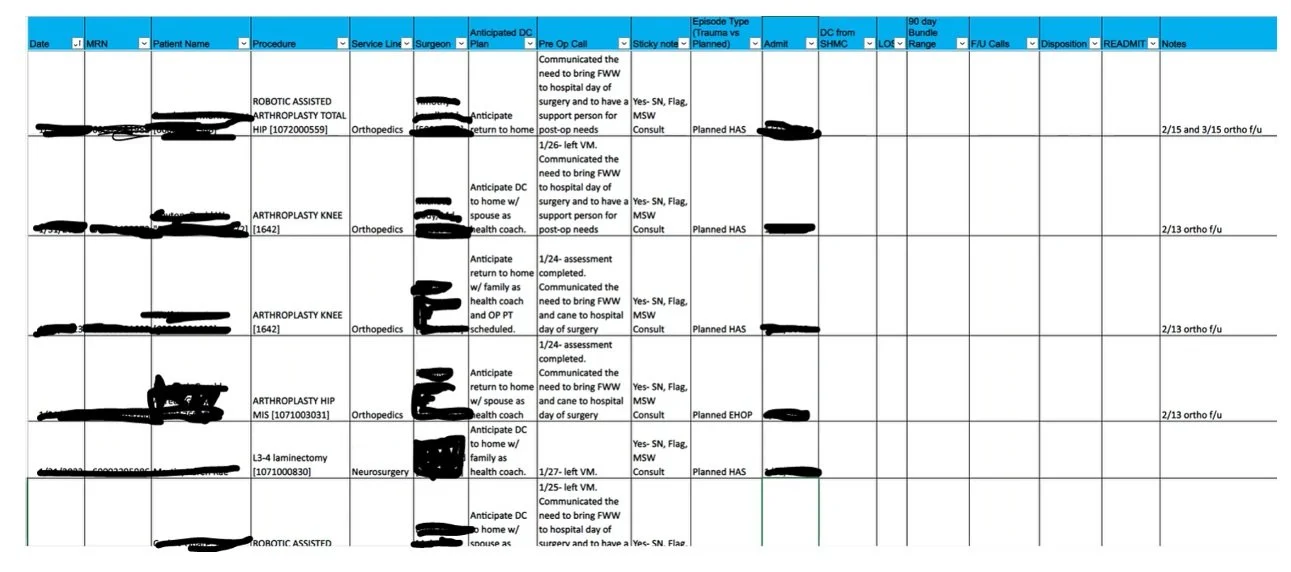
Manual Patient Tracking
- Folder system w/ paper work
- Excel spreadsheet
- Sticky notes
- Epic lists
Use various resources to develop a manual patient trackers
"Patients will be seen in the office with
their consult and they'll get all the way to me. I go to get the surgery authorization and then they realize that we're not in
network."
"I just had one last week and I spent four hours on the phone. I'm trying to get in network benefits for the patient."
"There are 5,000,000 places where you literally have to go to find the information. ......I probably have at least 35 websites for insurances that I go on and I have to have their passwords."
"Hard to find information on website & then you have to call in the insurance company (once per day)."
"Sometimes the care givers are not made aware that a patient left a skilled nursing facility, and they only
have a certain window to connect with them to submit for reimbursement. Those patients often get lost, which is extremely sad because those patients are the most vulnerable ones that need to follow up with them the most."
" I send myself a message and I built a little dot phrase to have a template of what they're bundle day range is and then I will put in my template, you know first phone call, second phone call, final phone call in the first one is usually within, you know, the first seven days of them getting discharged."
Sometimes if we want to follow up with a patient , we will write a reminder on a sticky note or a piece of paper.
So it's kind of inefficient and what happens if you lose that sticky note?
Pain Point #3: Difficult for caregivers to communicate with other internal & external caregivers to coordinate patient care.
4. PATIENT JOURNEY TRACKER
Caregivers can build their own visual tracker to manage their patients. Automatically updates based on chosen data sources.
Write notes, set reminders to generate task list.
"There's not a way for us to know if we're calling a specialty for, say, a pulmonologist who their MA is who their scheduler is, & how to best connect with that team."
"Calling the provider office is an option for us, but if there's a better way for us to communicate, such as
a teams message or in basket message. Better than you know sitting on the phone, trying to call and schedule."
"Can'tputspecificpatientinformation onteams.It'snot secure and so they have highly encouraged us to use the epic secure chat."
"I have to Google a doctor's name in a city. Then I'll ask the patient. Oh, is it at this clinic and they'll be like, yeah, that's the name of it."
"A lot of patients don't answer. I do call from this teams phone, but it does show that I'm based out of Walla Walla. Not actual Spokane Sacred Heart phone number."
We get lots of complaints about our phone system. Sometimeswelosephonecalls anditsisfrustrating.
"It's very cumbersome to get on the phone all the time, patients start getting phone call fatigue."
"We have a outside vendor that provides texting reminders to patients. But the frustrating thing is it just says you have an appointment at Providence on this date and this time and it doesn't state what clinic.
For example, if you have an elderly patient and she might have three different visits and she got a text reminder that says you have an appointment today, she shows up in
our clinic here and we look in her chart and see, oh, it's not in our clinic. You need to be downtown with this other doctor.
"Why do we have to print something that came in electronically for us to scan it in? Why can it automatically just transfer over to the right system?"
Quotes
" We are unable to access or leverage other resources from other specialties or teams. You need to know other team's SharePoint sites and do some investigation to try to find information."
"Teams establish their own resource centers, but it's limited. It's just learning where all the information is kind of cumbersome."
"There's not a centralized place for caregivers to share alerts. There's a limit on what caregivers can put in epic when it comes to adding alerts or flags to the chart, which make it difficult to some clinics who want to communicate a certain thing."
"There is no one standardization for template to ask questions within Providence, or at least within our clinics here."
Impact
Impact
Impact
Patient care information from other facilities
EXTERNAL CAREGIVERS & PROVIDERS
PROVIDER SUPPORT
Procedure scheduling
Collaborates with hospital OR + patient to schedule surgery
Office visit support
Patient check-in, office procedures
Insurance authorization
Submitting prior authorization request from insurance plans for treatments and procedures.
Referral management
Based on referral orders/requests, call patients (x3) to schedule appointment for consultation.
Bundled payments + Readmission prevention (Medicare Bundle: RN Navigator)
Follow patient throughout surgery to 90 days after surgery / discharge from hospital
Communication module within PAA
Phone
Phone
Fax
Email
Epic OpTime Module
Epic Compass Rose Module
Phone
TEAM RESOURCES
Epic Hyperspace
Easy for patients to connect with care team
Copies information from Epic report + filters and manually updates to track patients
MPULSE
Care gap closure text message reminders.
Increased call volumes
Poor patient & caregiver experience
Pain Point #5: Caregivers are use multiple solutions, tools and screens to accomplish day-to-day activities.
Impact
Caregiver burnout
Decreased productivity
Decreased work satisfaction
Pain Point #6: Care teams struggle to find resources to support patients.
Impact
Decreased quality of care: Unaware of internal & community resources to support patients.
Decreased productivity
Benefits
MS Teams Chat
Quick chat & collaboration with team members
Quick and instant responses
Document share
Team + individual chat
Doesn't require EMR to be open to use
Not HIPPA friendly
Some providers refuse to use it
Inability to search for clinicians by role, location & other factors.
Unable to use with patients or other clinicians from other healthcare facilities.
EPIC SECURE CHAT
Quick chat & collaboration with Providers & other clinicians
Quick and instant responses from providers & clinicians
Inability to search for clinicians by role, location & other factors.
Unable to use with patients or other healthcare facilities.
Requires Epic to be open
Benefits
Increase support bandwidth
Decreased call volume
Improve coordinated care
Increase accuracy of information
Operational efficiency
Caregivers can easily track patients for easy follow-up.
2. ASYNCHRONOUS CHAT + W/ AUTOMATION
Caregivers use one tool to communicate with patients + internal / external care teams.
Caregivers can choose from a menu & build automated flows to streamline communication workflow.
Upload documents & images. Choose to transfer & save in EMR.
Easily invite, add, or transfer to other care team members.
5. DIGITAL LIBRARY
Resources that patients + caregivers can easily access.
Resources can be easily accessed and shared with patients / other caregivers.
MYCHART MESSAGING
Patient, provider, and clinician education that doesn’t require an immediate response.
Easy for patients to connect with care team
Additional f/up & information is required
Wordy messages
Unable to filter/flag/organize messages
Not categorized & hard to triage
Too many messages
TWISTLE
Pre-op & post-op education and surgery reminders.
Provides educational surgical information prior to surgery via text
Care plan reminders + instructions
Surgery appointment reminders
Generalized & not personalized
Not integrated with EMR
Content is not engaging or user friendly
Local customization: hard to manage quality of care from system
Time consuming to design & update pathways.Not bi-directional.
Generalized & not personalized
Not integrated with EMR
No next best action
Requires 2-3 FTE to manage
Caregivers use one tool to communicate with patients + internal / external care teams.
3. CLINICIAN ACTIVE DIRECTORY
Caregivers can easily find the right internal & external caregivers to chat with.
Search for caregivers by location, clinic, service, and role.
Caregiver profile to validate connecting with the right person.
Gaps
6. SUMMARY DASHBOARDS
Easy to access information & tools to streamline daily tasks.
Summary dashboard: Connects + pulls + summarizes key information for easy digestion.
SSO
Benefits
Improved operational efficiency
Benefits
Decrease leakage
Increase revenue (VBC + reimbursement)
Ability to measure referral rate
Streamline referral and care coordination process
Pain Point #1: Providers + care teams spend hours per day obtaining approval from health insurance plans for medications & procedures.
No reimbursement if procedures / medications were not approved prior.
Missed revenue if authorization is denied
Delay in patient care
Poor patient & caregiver experiences
Operational inefficiencies
Pain Point #2: Patient tracking and management is a manual process. Patients fall through the cracks between care episodes.
Lost revenue
Decreased Medicare reimbursement
Decreased quality of care
Increased call volumes (clinic to clinic)
Decreased patient outcomes (delayed/uncoordinatedcare)
Poor patient & caregiver experience
Pain Point #4 Communicating with patients is difficult
Impact